





ATGW-030 Bluetooth Zigbee WiFi Gateway
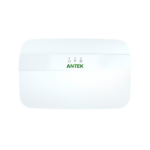

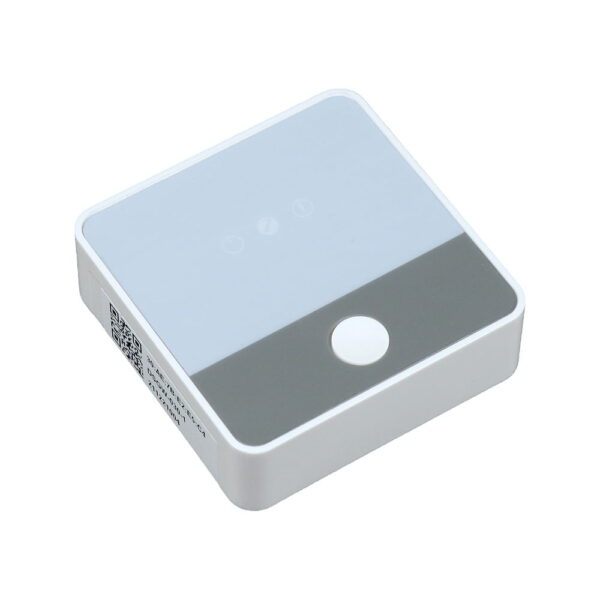
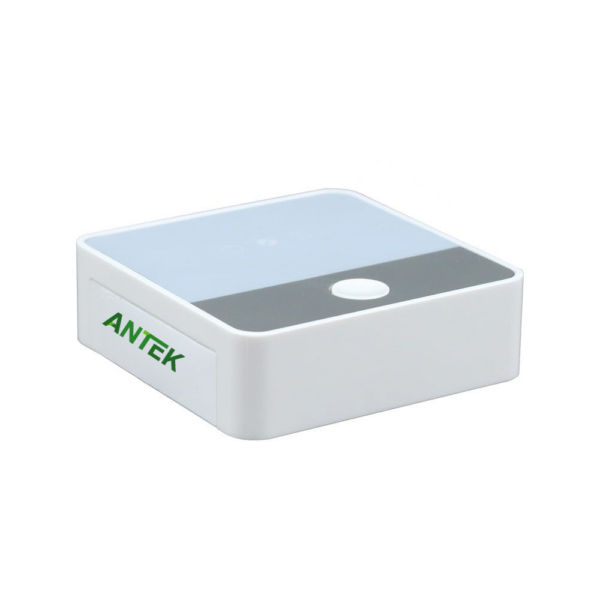
ATGW-030 BLE 5 Zigbee 3.0 WiFi 2.4G Ethernet gateway adopts MediaTek’s MT7688 WiFi platform to build IoT gateways for smart home. As it’s name indicates, ATGW-030 have rich connectivity models for you to tailor your smart home setup to perfection. Meanwhile, a WAN/LAN variable port (10/100 Mbps) and a Micro USB (5V/1A) for power supply provided. Elevate your smart home with the ATGW-030 automation hub NOW!
- Operating System (OS): Linux@ OpenWrt
- Processor: MTK7688 (MIPS24KEc at 580MHz)
- RAM: 64MB Available Space: 16MB (Development space for the user)
- Flash Storage: 16MB
- Supports IEEE802.11n, IEEE802.11g, IEEE 802.11b protocols
- Supports Bluetooth 5.2, Zigbee3.0, Wi-Fi 2.4G
- Description
- Reviews (0)
Description
Overview of Programmable BLE 5/Zigbee 3 to Wi-Fi/Ethernet Gateway
ATGW-030 is a specialized embedded hardware meticulously engineered to facilitate the work of IoT gateway developers. It provides a robust and adaptable platform with an array of tools and features that optimize the embedded software development process.
Key applications for this gateway include home automation, smart home management and energy management. In the energy sector, the gateway communicates with various devices including, but not limited to, electricity meters, industrial machinery and solar panels. In the area of smart home management, the gateway can monitor and control various elements such as door locks, water valves and thermostatic controls.
Features of ATGW-030 MediaTek IoT Gateway
Processor
Utilizes the MediaTek MT7688AN SoC, A 580MHz MIPS® 24KEc™ processor for efficient computing.
Modular Design
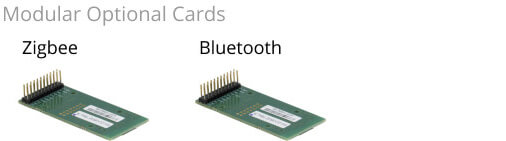
The hardware interface of the ATGW-030 is equipped with modular option cards, allowing for targeted customization to satisfy particular interface needs.
Multi-Wireless Support
ATGW-030 supports up to three simultaneous wireless protocols within a single unit.
Comprehensive Certification
Certification for the gateway extends to all supported wireless options, including Zigbee, FCC, CE, etc.
Integrated Development Environment
ATGW-030 supports the OpenWrt. Full access to the OS, including the development toolchain, is provided to compile the source code for local use. A unified development environment is furnished, complete with tools that support various programming languages, including C and C++, thereby enhancing the development process.
How To Develop ATGW-030 MediaTek IoT Gateway
Embedded Software Development Approach
Our IoT Gateway is designed to support full-stack embedded software development, showcasing our dedication to excellence in each phase of your project. From the preliminary concept and architectural design to long-term maintenance and updates. The embedded software development includes the following:
Firmware Development: This involves building low-level and custom software with precision to regulate precise hardware functions in a device, resulting in optimal performance and dependability.
BSP Development: We possess expertise in producing specialized software that seamlessly interacts between the operating system and the unique hardware configurations of a specific board.
OS Migration: We offer technical expertise and strategic guidance for migrating operating systems between different versions or platforms. Our focus lies on maintaining compatibility and improving the performance of the systems.
Driver Development: Our team excels in developing wireless module drivers, which allow the operating system to communicate more effectively with different hardware components.
Building an Application Using API
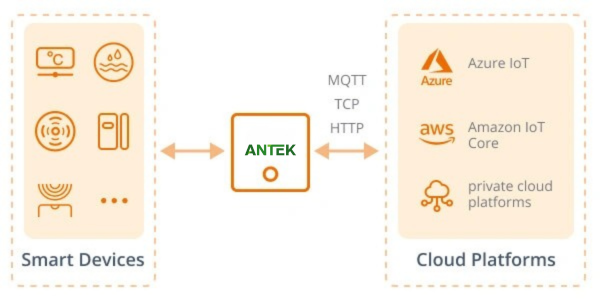
Our IoT Gateway provides rich APIs for rapid IT application development and seamless end-device integration. It supports communication protocols like MQTT, TCP, and HTTP and can integrate with public cloud platforms such as Azure IoT, Amazon IoT Core, and private cloud platforms.
Our gateway integrated with various existing smart devices, including Smart door locks, temperature and humidity sensors, etc., and provides robust support for integrating new devices. Developers can create customized applications effectively by directly calling the API from the gateway. This versatility streamlines the development process and provides a flexible solution for diverse requirements.
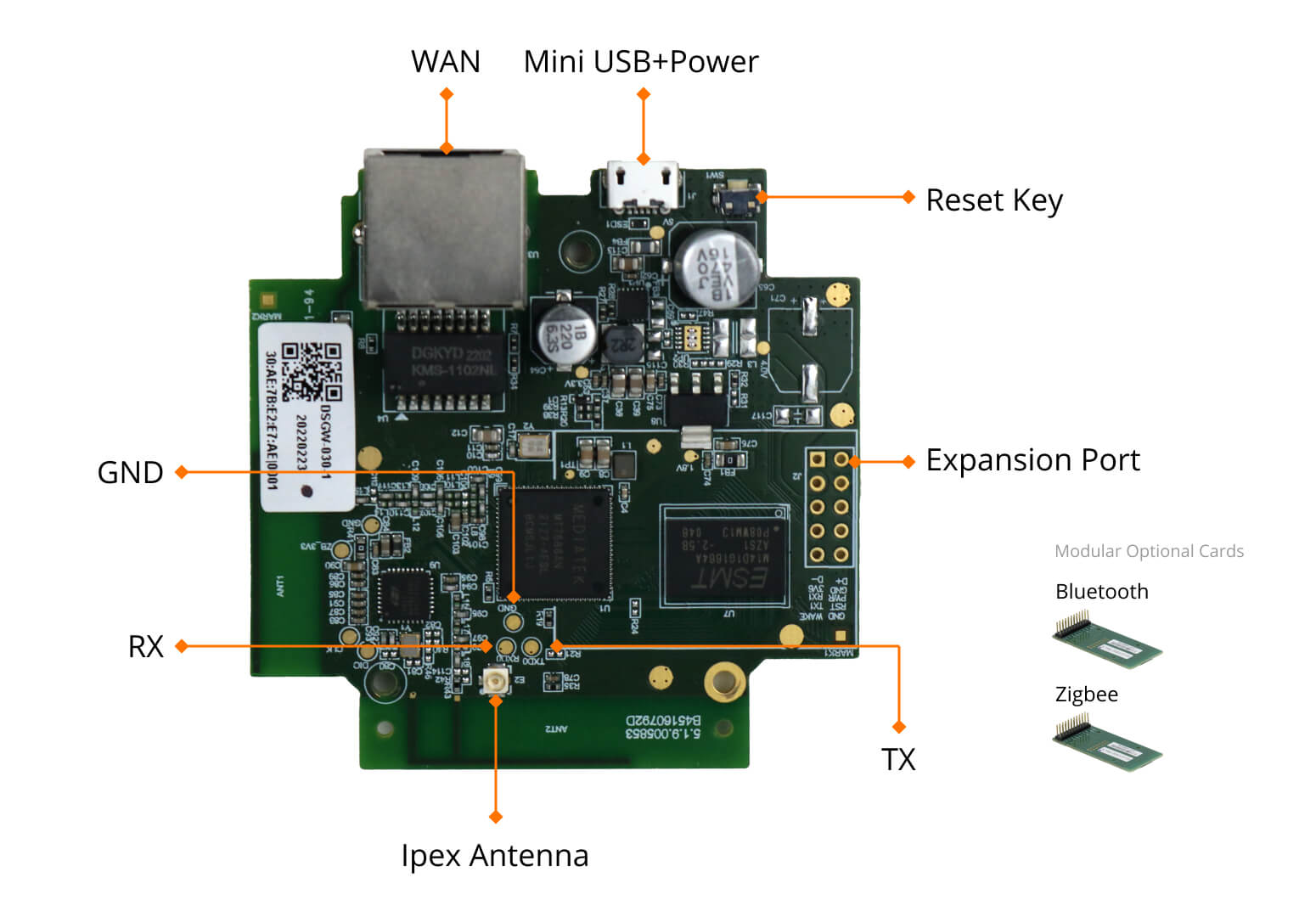
Board Interfaces of ATGW-030 MediaTek IoT Gateway
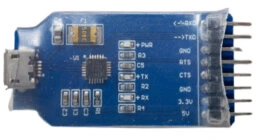
PCB Serial Port
Before setting up your development Test Bed, connect the PCB Serial Port (TX, RX, GND) to your developed PC via a USB-to-serial bridge.
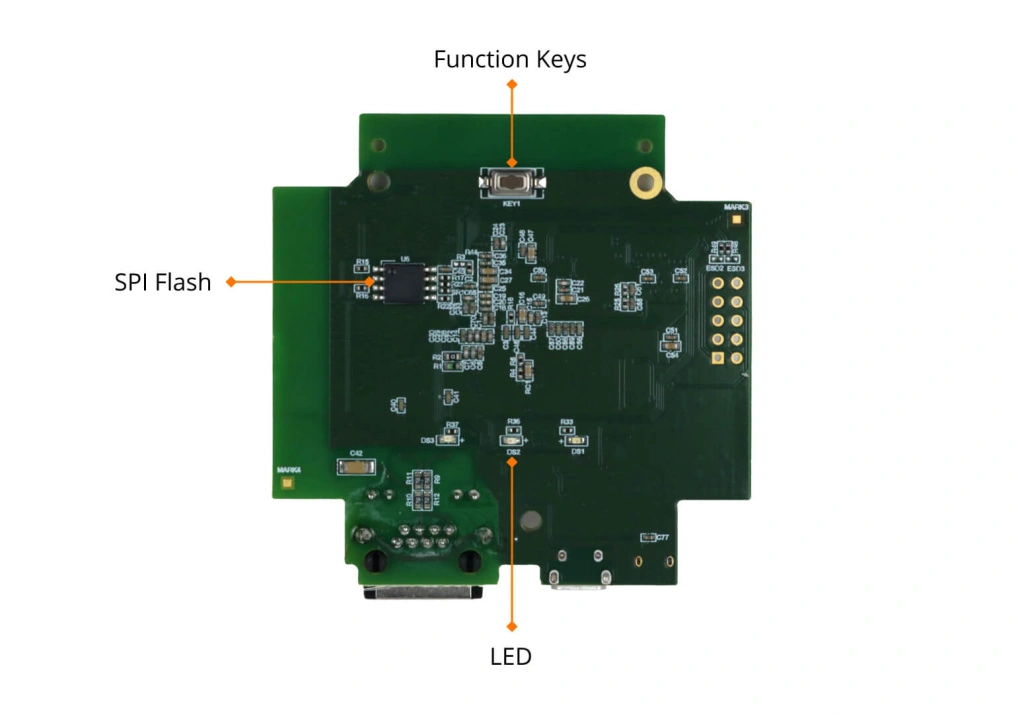
SPI Flash
To firmware the program on the IoT gateway board, it is necessary to utilize an SPI (Serial Peripheral Interface) flash programmer to program the SPI NOR flash.
Remove the SPI Flash: Begin by carefully removing the SPI flash from the IoT gateway, following proper procedures to avoid any damage to the component.
Place into the SPI Flash Programmer: Once the SPI flash is removed, place it into the SPI Flash programmer, ensuring it is properly aligned.
LED
The IoT Gateway Board features three software-controllable LEDs, identified as pwrled, zigbee, and errled. These LEDs provide a versatile interface for monitoring and signaling, allowing developers to create responsive and intuitive interactions within various applications.
Function Key (Button)
The IoT Gateway Board includes one programmable button, designed to trigger specific scripts when pressed. The system automatically calls the button scripts located at /etc/rc.button/BTN_1 and /etc/rc.button/BTN_0, allowing for streamlined interactions and control.
Expansion Port for Wireless Module
The IoT Gateway Board features an expansion port that supports various wireless modules, including Bluetooth, Zigbee. Users can select and integrate the specific modules they need, allowing for customized connectivity and flexibility in different applications
Support of ATGW-030 ATGW-030 MediaTek IoT Gateway
Community
Got questions or thoughts? Swing by our forum and chat with us! We truly cherish your feedback. After all, we grow and shine together with our awesome users and community!
Resources
Driver Download
Firmware Download
SDK Download
Flash Tool Download
Application of ATGW-030 MediaTek IoT Gateway
| Smart Apartment | On site Video | |
|---|---|---|
| Pain Point: 1. The issue with unpaid rent 2. Unified management by headquarters 3. Prevent stores from running out of orders 4. Absence of PAAS layer |
Coming soon | |
| Advantages: 1. Support multiple docking methods 2. Supports multiple authorization methods (remote door opening, offline password, watch password, long-term password) 3. Professional installation team 4. Equipped with professional debugging tools |
||
Model List of ATGW-030 MediaTek IoT Gateway
| Feature | RAM | Flash | Wi-Fi 2.4G | Bluetooth 5.2 | Zigbee3.0 |
|---|---|---|---|---|---|
| ATGW-030-1 | 64MB | 16MB | ● | ● | |
| ATGW-030-2 | 64MB | 16MB | ● | ● | |
| ATGW-030-4 | 64MB | 16MB | ● | ● | ● |
| ATGW-030-5 | 64MB | 16MB | ● | ● |
| Feature | RAM | Flash | USB | Wi-Fi 2.4G | Bluetooth 5.2 | Zigbee3.0 |
|---|---|---|---|---|---|---|
| ATGW-030-3 | 64MB | 16MB | ● | |||
| ATGW-030-6 | 64MB | 64MB | ● | ● | ||
| ATGW-031-1 | 64MB | 16MB | ● | ● | ● | |
| ATGW-031-2 | 64MB | 16MB | ● | ● | ● | |
| ATGW-031-3 | 64MB | 16MB | ● | ● |
FAQs of ATGW-030 MediaTek IoT Gateway
Does ATGW-030 a LoRa BLE gateway?
ATGW-030 does not support LoRa. The major applications of our BLE LoRa gateway ATGW-014, which combines BLE 5.2 and LoRaWAN wireless communication, can be used for indoor positioning (for people and assets) and environmental monitoring. The BLE LoRa gateway receives Bluetooth beacon messages from surrounding devices and sends them to the LoRaWAN gateway installed in each building, which then sends the messages to the server.
The simplicity of installation makes this method advantageous. For on-site deployment, there is no need for wiring. You just simply install BLE beacons in the hallway’s center aisle and make them connected with LoRaWAN gateway. Low-power and long-distance transmission are made possible by Bluetooth and LoRaWAN’s conversion strengths. As a result, long-distance communication is made possible without the cost of using the cellular network.
Can ATGW-030 work as a Bluetooth gateway hub?
Yes, It has BLE module included and can work as a smart Bluetooth gateway hub. A Bluetooth gateway hub is basically the central and organizing point of your BLE-enabled network. It combines all of the signals sent by smart BLE devices and systems and forwards them to the servers over high bandwidth networks like Wi-Fi/LTE 4G/Ethernet, enabling you to connect and manage your BLE end devices and systems from one location. (Remember that the hardware that houses the software is called a Bluetooth gateway hub.
I want to purchase Zigbee Ethernet gateway, can this model support?
ATGW-030 is a multifunctional Zigbee gateway with RJ45 LAN port. It serves as a link between Zigbee-based wireless sensor networks and IP-based Ethernet wired networks, with built-in Zigbee and Ethernet protocol conversion functions. With ATGW-030 Zigbee LAN gateway, it is simpler for you to connect the nodes quickly and steadily when you use Ethernet as the backhaul connection.
What is a BLE 5 gateway?
ATGW-030 BLE 5 gateway adopts Antek IoT‘s self-developed DSM-05D BLE module, consisting of wireless BLE SoC EFR32BG21 from Silicon Labs. High performance and low-powered, secure to IoT applications. EFR32BG21 supports BLE and Bluetooth mesh, allowing you to implement a wide range of Bluetooth IoT applications like BLE beacon location tracking, data transmission, and IoT remote monitoring.
As a BLE 5 gateway, ATGW-030 BLE hub consumes less power, allowing for longer operation and greater range. Meanwhile, BLE 5 enabled the gateway has longer communication distance and faster data transmission. You can see more Bluetooth version comparison info here.
ATGW-030 BLE 5 gateway is able to send the information temperature and humidity gathered by the BLE sensor devices, to a cloud server via RJ45 cable or WiFi, and then relays messages from the cloud server to BLE end devices. By doing so, users can see data visualization on console or mobile phone APP.
Additionally, it can also function as a Bluetooth scanning device for BLE beacon/tags. Scan the beacon, collect the beacon’s broadcasting information such as UUID, name, and RSSI, and then send the data packet to the the edge computing gateway, and then send to position engine of reliable indoor navigation platform. You may also be interested in one-way and bidirectional communication mode of Bluetooth gateways.
Is ATGW-030 a BLE-enabled router?
When a packet travels from the source to the destination, a router inspects its destination IP address, calculates the best way for it to reach its destination and then forwards it accordingly. BLE-enabled router can be seen as a router with Bluetooth module and protocol conversion functionality. ATGW-030 can be treated as a Bluetooth router providing two main connections to the internet, high speed via WiFi and low speed via Bluetooth. See more Bluetooth router vs Bluetooth gateway info here.
Can ATGW-030 be a BLE Ethernet/Wi-Fi/LTE gateway?
The commonly seen uplink data transmission way are Ethernet, Wi-Fi, and Cellular LTE. As you can see from its block diagram, ATGW-030 has a RJ45 Ethernet interface, which allows you to make a reliably strong, fast-speed networking connection. Especially when you have multiple home security cameras. While to avoid cable layout hassle, Wi-Fi has already become the mainstream of smart home, so you do not need to wrooy about Wi-Fi connection. If you want to have an LTE 4G option, welcome to visit ATGW-210 IoT gateway page, it has the fullest choices and gain great popularity in home automaion.
Is ATGW-030 a Zigbee Bluetooth gateway?
Yes. It has both Zigbee module and Bluetooth module. You can control Bluetooth devices and Zigbee devices on one all-in-one smart home hub gateway, regardless of its commucation protocols. Scenario setting and automation rules can be defined as you like. We can provide hardware-only and fully-documented SDK files to help accelerate your development process.

Reviews
There are no reviews yet.